For remodelers

Kitchens and baths priced in minutes, billed in stages.

Kitchen and bathroom remodel templates with live margin, change orders your client signs before you start the extra work, and progress draws that keep the cash ahead of the job.

Kitchen and bath templates

Full kitchen remodel, countertops, cabinets and islands. Full bath, tub-to-shower, vanity and exhaust fan. Eight templates you can edit and save.

Change orders in writing

Send a change order as a link. The client signs it on their phone before the extra work starts, and the contract total updates.

Draws and retainage

Set deposit, rough-in and finish draws on the Pro plan. Print a retainage percentage and bill its release as the final draw.

Start from a full kitchen, not a blank page.

Enter the cabinet run and the scope builder works out countertop area, backsplash tile and labor. Slide the target margin on the Pro plan and every price updates before the client sees it.

ESTIMATE · KITCHEN REMODEL

  • Stock cabinets✓
  • Quartz countertop✓
  • Demolition and disposal✓
  • Permits✓
  • Cabinet installation✓
  • Plumbing and electrical rough/finish✓

A draw schedule the client agreed to up front.

Set the stages when the job is sold. Each progress invoice shows what is complete, what was paid and what is due now. One PIN-protected portal per client, showing the whole job, is Coming soon. Building additions or new homes? See general contractors.
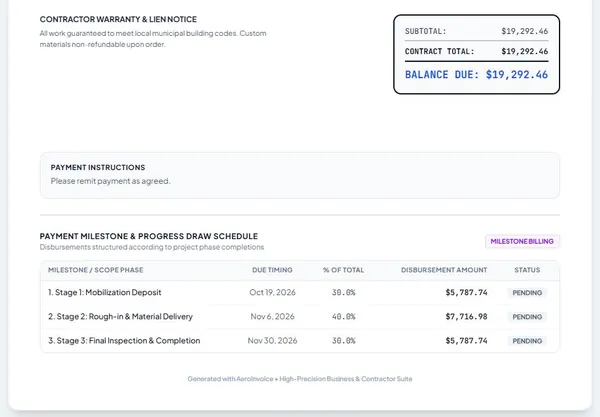
An invoice with a 30/40/30 progress draw schedule (sample data)

Remodelers ask us.

Can the client sign the estimate and change orders from their phone?
Yes. Each estimate and change order goes out as a private link. The client reviews it and signs with a typed or drawn signature. No app or account needed.
How do progress draws work?
On the Pro plan, set the stages when the job is sold, for example 30% deposit, 40% at rough-in and 30% at finish. Bill each stage when it is done. Each invoice shows the schedule and what has been paid.
Can I attach photos and plans?
On the Business plan you can attach photos, plans and signed contracts to a document. Up to 6 photos print on the PDF; other files stay attached to the document.
How fast do I get paid when a client pays an invoice?
The payment posts to the invoice once Stripe confirms it. The money reaches your bank on your own Stripe payout schedule. Stripe sets that timing, and your first payout usually takes longer.
Do I need a card to start?
No. The free plan covers 5 documents a month with no card. Upgrade when you need unlimited documents, live margin and progress draws.

Price the next kitchen tonight.

Free to start. No card needed. Founding members lock in a lower price while they stay subscribed.