Pay applications
Contract sum, approved changes, completed to date, retainage, previous payments and current due, laid out clearly.
Features / Projects and progress draws
Set a draw schedule when the job is sold, then bill each milestone as it is finished. AeroInvoice tracks the contract, approved changes, percent complete, retainage and what has already been paid, so every draw is right.
Try it
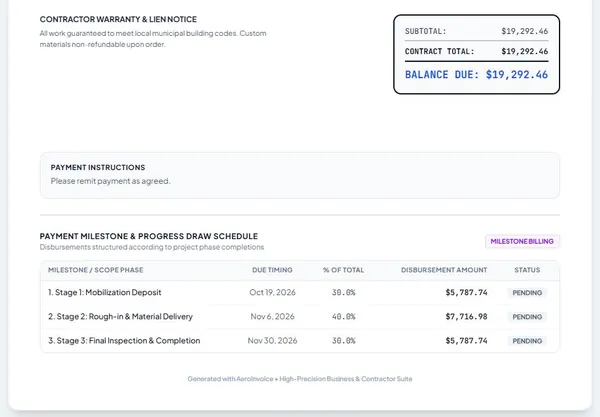
Split the contract into deposits and milestones by percentage or amount.
Budget, materials and progress for every active project on one screen.
Invoice the next milestone in one tap, less the retainage percent you set.
Bill the retainage release as the final draw when the job is signed off.
Contract sum, approved changes, completed to date, retainage, previous payments and current due, laid out clearly.
Signed change orders roll into the contract sum, so every later draw is based on the right number.
See all active projects, their budgets and progress at once, whether you run one crew or ten.
Log materials to the job and see what is left before you are over.
One PIN-protected portal per client will show the same progress, so draws are expected. Coming soon Today each draw invoice goes out as its own link.
Each milestone shows pending, invoiced or paid.
Free to start. No card needed. Set up in about ten minutes.