For general contractors

Run every job, sub and draw from one place.

Remodels, additions and new builds billed in stages, with sign-and-pay links your client opens instead of calling you.

Draws that match the work

Set milestone deposits up front and bill each stage the day it passes inspection.

Change orders in writing

Clients approve and sign extra work from a link before you buy the materials.

Every job side by side

Budget, materials and progress for each project on one screen.

Start from lines your trade already uses.

Pick a general contractors template in the scope builder, set your quantities and margin, and send. Edit anything, save your own.

ESTIMATE · GENERAL CONTRACTORS

  • Demolition and haul-off✓
  • Framing labor, 1,200 sq ft✓
  • Drywall hang and finish✓
  • Change order: added pantry wall✓

Clients open a link, not your phone.

Every estimate, change order and draw goes out as a link with approvals and a pay button. One PIN-protected portal per client, with each job’s progress, is Coming soon.
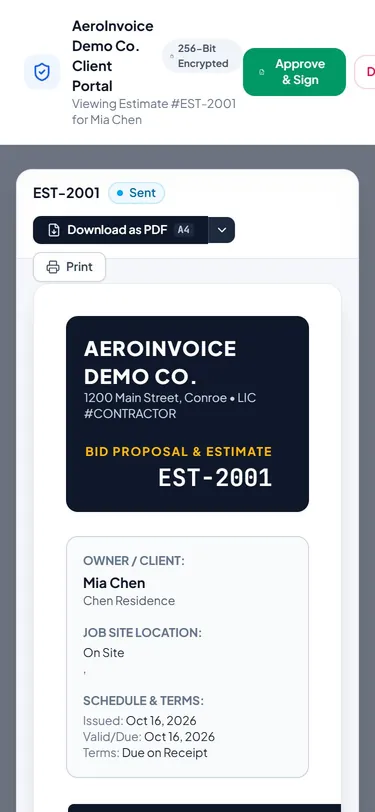
The estimate link as the client sees it on a phone (sample data)

General contractors ask us.

Can I bill in progress draws?
Yes. Set the draw schedule on the estimate, then invoice each milestone with one tap as the job moves.
Can I track subcontractor costs?
Yes. Log subs and materials against the job so your margin stays honest.
How fast do I get paid when a client pays an invoice?
The payment posts to the invoice once Stripe confirms it. The money reaches your bank on your own Stripe payout schedule. Stripe sets that timing, and your first payout usually takes longer.
Do I need a card to start?
No. The free plan covers 5 documents a month with no card. Upgrade when you need unlimited documents, client links or progress draws.

Your clients can pay your next invoice tonight.

Free to start. No card needed. Set up in about ten minutes.