For contractors and field crews

Send the bill from the truck.

Quote on the lot, bill each stage the day it is done, and let your client pay from their phone. Built for crews who work where the signal doesn't.

Free for 5 documents a month. No card needed. Compare plans

Payments by StripeWorks with no signalInstalls on any phoneClient e-signatures142 trade templatesProgress drawsTime and mileageClient linksYour logo on every PDFNo fee from AeroInvoice

Quote. Approve. Bill. Paid.

One straight line from the first number to money in the bank. Every step lives in the same app.

Quote.

Price it on the lot.

Pick from 142 trade templates, set your margin, and every line prices itself.

Scope and margin builder
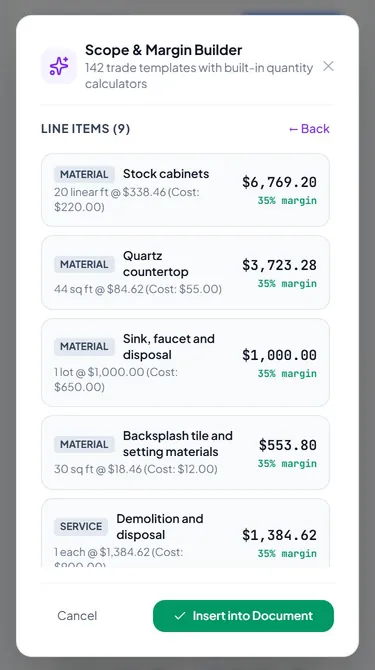
Scope and margin builder on a phone, pricing a kitchen remodel from a trade template (sample data)

Approve.

They sign from their phone.

Your client opens a private link with your name on it, reviews and signs. No app, no account.

Client links
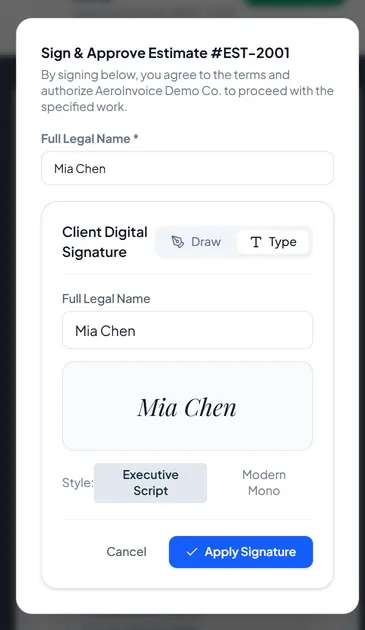
A client signing an estimate from the link, on a phone (sample data)

Bill.

Draws that match the work.

Bill each stage the day it is done, or turn the estimate into one invoice with a tap.

Progress draws
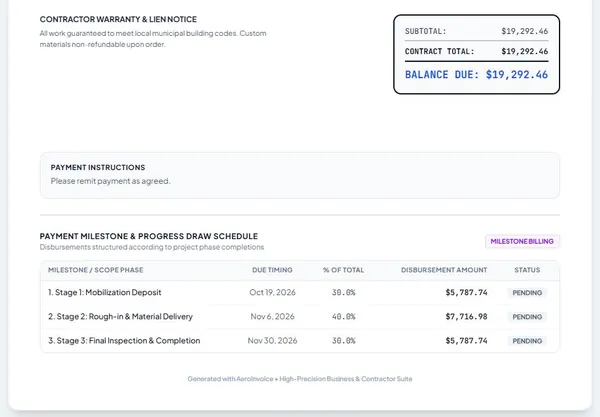
An invoice with a 30/40/30 progress draw schedule (sample data)

Paid.

The money comes to you.

Connect Stripe and clients pay the invoice by card from the link. Stripe pays out on your Stripe payout schedule. No terminal.

Online payments
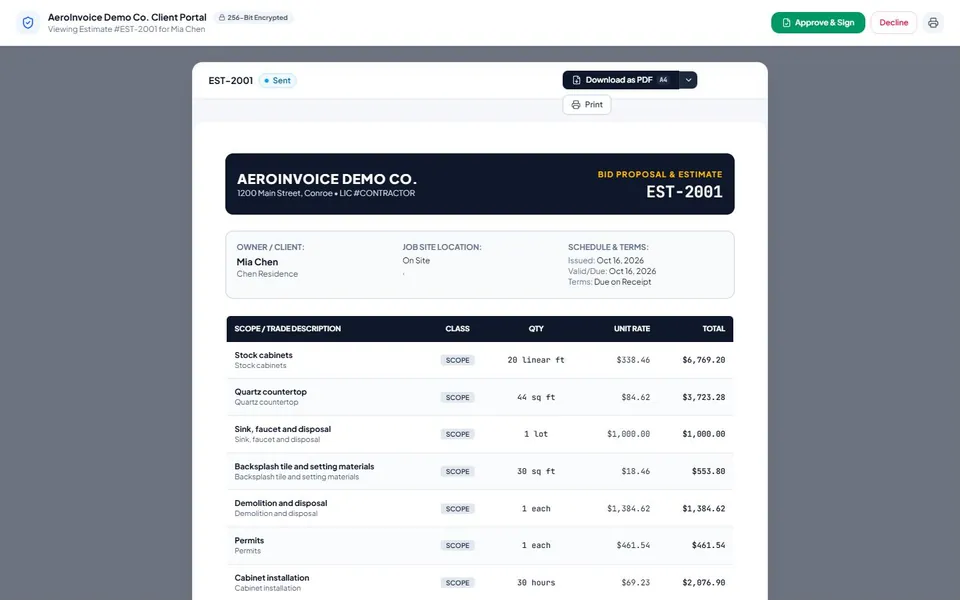
The estimate link as the client sees it on a computer, with Approve and Sign (sample data)

The real app

This is what you get. No mockups.

Every screen below is a capture of the live app at app.aeroinvoicing.com on October 16, 2026, using a demo account and made-up client data.
  1. Scope and margin builder pricing a kitchen remodel from a trade template (sample data)
    01 Pick a trade template. Quantities and a 35% margin price every line.
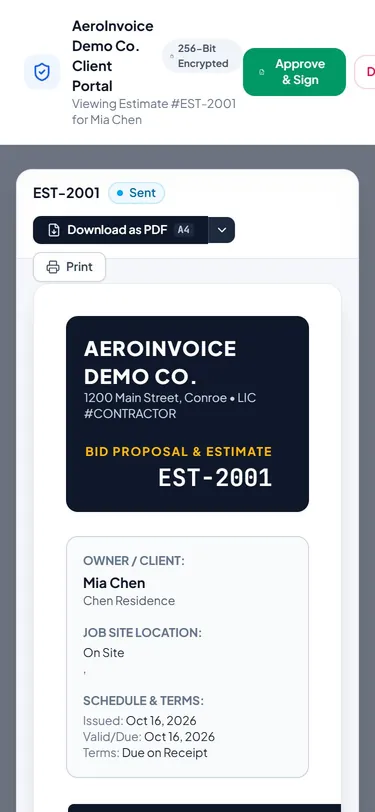
  2. The estimate link as the client sees it on a phone (sample data)
    02 Your client opens a private link. No app, no account.
  3. A client signing an estimate from the link (sample data)
    03 They type or draw a signature to approve, or decline.
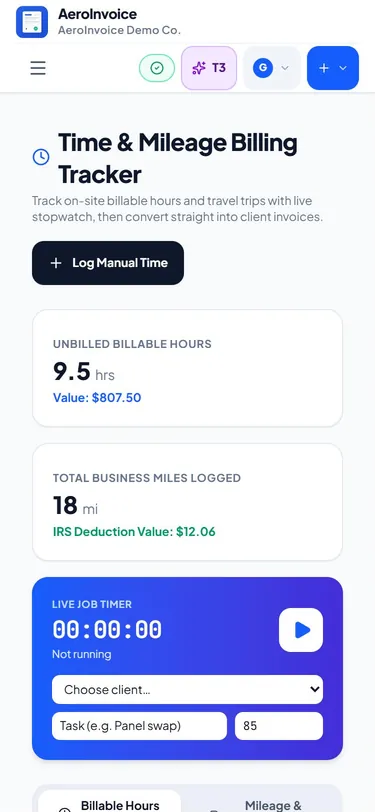
  4. Time and mileage tracker with logged hours and a trip (sample data)
    04 Log hours and miles on site, then bill them.

AeroInvoice by the numbers

trade templates
142
trades covered
31
document types
15
layouts and designs
8 + 50
free documents a month
5
AeroInvoice fee on payments
$0

Counted from the app itself, not from customers. We are new, so we do not quote user counts or reviews we do not have.

What works today, and what does not yet.

If something is not built, it says Coming soon, and no plan charges for it.

WORKS TODAY

  • Estimates and invoices from 142 trade templates
  • Client links to review, e-sign and pay (pay needs Stripe connected)
  • Progress draws, deposits, change orders, retainage on progress invoices
  • Time and mileage tracking that bills to invoices
  • Works offline as an installed app, syncs when back online
  • Expenses, financial health reports, PDF export
  • White-label, watermarks, attachments and receipt scanning (Business)
  • Recurring invoices that create and email themselves on a schedule (Business)

COMING SOON

  • One PIN-protected portal per client Coming soon
  • Bank and card feeds with reconciliation Coming soon
  • Automatic receipt-to-charge matching Coming soon

The rest of the job, handled.

Approvals, draws, receipts and profit live next to the invoice, not in another app.

Clients approve and pay from one link.

Every estimate, change order and invoice goes out as a private link. Clients review it, sign or decline, and pay. No app and no account.

One PIN-protected portal per client Coming soon

Client links
The estimate link as the client sees it on a computer, with Approve and Sign (sample data)

Draws that match the work.

Set the schedule once. Bill each milestone as it passes. Retainage is worked out on every progress invoice.

  • Deposits by percent or amount
  • Retainage % on each draw, released as the final draw
  • Change orders roll into the contract
Progress draws

No signal, no problem.

Install it on your phone and keep quoting in a basement. It syncs when you are back in range.

Works offline

Know your real profit, not just your revenue.

Collected cash, expenses and net profit, updated as invoices are paid.

Financial health
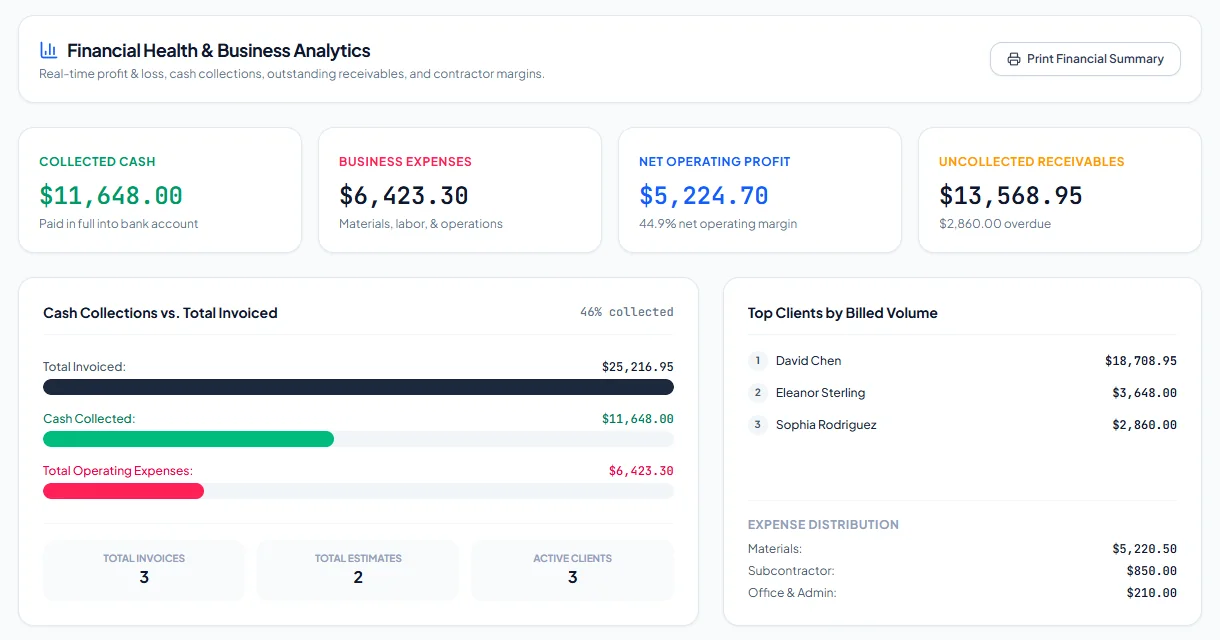
Financial health dashboard with collected cash, expenses, net profit and receivables

Bill the hours. Log the miles.

Start the timer when you arrive. Hours and trips drop onto the invoice.

142

trade templates ready on day one

Time and mileage

Hold, then let go.

This is your client paying invoice 1042. Press and hold to pull the line tight, then release.

Example data. Space or Enter works too.

INV-1042

Kitchen remodel, draw 3

Sent

$12,125.00

0%
  1. Sent
  2. Checkout
  3. Paying
  4. Paid

Set up for your trade.

Templates, line items and wording for 31 trades. Start with yours.

From the founder

You’re early. That’s the point.

AeroInvoice is made in Graham, Texas, built by watching contractors get paid late. Generic invoicing apps were not built for job costing, progress draws or the paperwork a jobsite actually makes.

Questions go to the person building the product. Early customers help pick what comes next.

AeroInvoice, made in Graham, Texas

Start free. Pay when you outgrow it.

FREE

$0/month

5 documents a month. No card needed.
Start free

PRO

$15/month

Unlimited documents for working crews.

  • Unlimited invoices and estimates
  • Progress draws and client e-sign links
  • Time and mileage tracking
  • All 8 document layouts
Go Pro

Compare all plans

Founding members

Help shape AeroInvoice: test it and lock in a founding price.

A limited number of founding spots on Pro and Business, at a lower price that stays locked while you stay subscribed. Test new builds with us and you get an extra $5 a month off.

Founding Pro: $10/mo, regularly $15

Founding Business: $15/mo, regularly $29

Spots are limited.

Questions contractors ask.

Does my client need to download anything?
No. They open a link, review, sign and pay in their browser.
What does it cost to get paid?
Online payments run through your own Stripe account at Stripe's standard rates. AeroInvoice adds nothing on top.
What if I have no signal on site?
It keeps working offline and syncs when you are back in range.
What isn't built yet?
We label everything that isn't finished. Coming soon: a PIN-protected portal per client, bank and card feeds with reconciliation, and automatic receipt-to-charge matching. You won't pay for any of them before they ship.
Can I bill in stages?
Yes. Set up draws on any project and bill each one as the work is done.
How fast does the money land?
The invoice shows Paid as soon as Stripe confirms the payment. The money then reaches your bank on your Stripe payout schedule. AeroInvoice doesn't control that timing, and your first payout usually takes longer.

Your clients can pay your next invoice tonight.

Free for 5 documents a month. No card needed.