
What Is AIA Billing? G702 and G703 Explained for Contractors

AIA billing is a standardized way for a contractor to ask for payment on work completed so far. AIA Contract Documents describes it as a process for submitting and processing payment applications during a construction project. In practice, that means two forms: the G702, a one-page summary of what you are asking to be paid, and the G703, a continuation sheet that lists the work line by line. AIA stands for the American Institute of Architects, the group that publishes these forms.
If you have just been told a job requires “AIA billing,” this guide covers what the forms are, what goes on them, how the process runs month to month, and where payment gets held up.
Manage progress draws from the field. AeroInvoice helps contractors send quotes, manage progress draws, and handle client payments from a mobile device, even with limited connectivity. Visit AeroInvoice
TL;DR
- AIA billing is progress billing on standard forms: the G702 summarizes the payment request and the G703 itemizes it.
- The G703 breaks your contract into a schedule of values. Each line shows work completed, stored materials, and retainage.
- On many jobs an architect or project manager reviews the application and certifies the amount before the owner pays.
- Not every job uses the same G702/G703 pair. The right form depends on the contract type and your role on the project.
- Most delays come from numbers that don’t match across the two forms, or from not following the contract’s submission rules.
Table of Contents
- What AIA billing means
- What an AIA payment application is
- The G702: Application and Certificate for Payment
- The G703: Continuation Sheet
- What the schedule of values is
- Retainage, in plain terms
- How the AIA billing process runs
- Not every job uses the same forms
- Where AIA billing goes wrong
- Doing AIA billing without a spreadsheet nightmare
- Our perspective
- How AeroInvoice handles progress draws
- Quick glossary
- FAQ
- Sources
What AIA billing means
AIA billing is also called AIA progress billing. Instead of sending one invoice at the end of a job, you submit a payment application for the work finished during a billing period. On a long job, that is how you keep money coming in while you are still buying materials and paying crews.
The approach gives owners and contractors a shared format. According to AIA Contract Documents, it creates a structured framework that improves transparency and consistency between contractors and project owners. Everyone reads the same layout, so nobody has to decode a custom invoice.
The phrase gets used loosely. Some people say “AIA billing” for the forms themselves, others for the whole monthly routine of building, submitting and getting approval on a pay app. All of those mean the same thing in day-to-day talk.
What an AIA payment application is
An AIA payment application is a structured request for payment for work completed on a construction project. Per AIA Contract Documents, the G702 and G703 lay out the work completed, its value, and the payment requested.
You will hear it called a pay app, a draw request, or an application for payment. Different names, same document.
Here is how it differs from a regular invoice:
| Standard invoice | AIA payment application | |
|---|---|---|
| What it bills | A flat amount or a finished job | Work completed to date against a contract |
| Detail | Usually a few line items | Every line of the schedule of values |
| Retainage | Rarely tracked | Shown per line and in total |
| Review | Client pays or doesn’t | Often certified by an architect or project manager first |
| Rhythm | One time or ad hoc | Repeats each billing period |
The G702: Application and Certificate for Payment
The G702 is the cover sheet. AIA Contract Documents says it goes to the owner or payment issuer and includes the billing period, the contract value, the work completed to date, and the amount requested.
It does a second job too. The AIA Design Shop explains that the G702 is also the architect’s certification, and that it lets the architect certify an amount different from the one the contractor asked for, with an explanation. So the form is both your request and the reviewer’s answer.
On a typical G702 you will find:
- The project, owner, architect and contract details
- The original contract sum and any net change by change orders
- The total completed and stored to date
- Retainage held
- Earned less retainage, less previous certificates for payment
- The current payment due
A contractor signs it. On some jobs a notary is part of the process, depending on the contract and the owner’s requirements, so check yours before the first submission.
The G703: Continuation Sheet
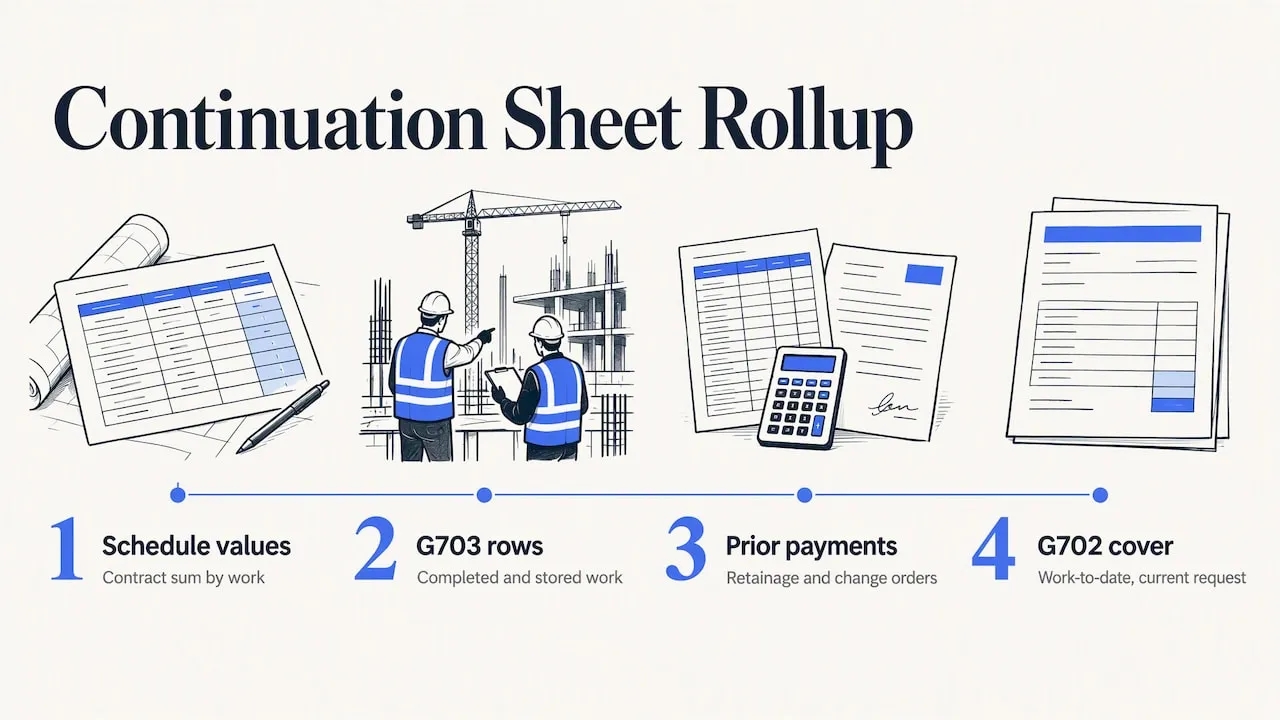
The G703 is the detail behind the G702. It is a table, and every row is one piece of the work.
The AIA Design Shop notes that the G703 breaks the contract sum into portions of work, following the schedule of values the contractor prepares. The forms then show work completed and stored, retainage, previous payments, change orders, and the current amount requested.
What the columns do
Column names vary slightly by version, but the logic is the same:
- Item and description. One line per scope item, such as mobilization, rough-in, drywall or closeout.
- Scheduled value. What you and the owner agreed that line is worth. All lines add up to the contract sum.
- Work completed from previous applications. What you already billed.
- Work completed this period. What you are billing now.
- Materials stored. Materials bought and stored on or off site but not yet installed, where the contract allows billing for them.
- Total completed and stored to date. Previous plus this period plus stored.
- Percent complete. Total to date divided by scheduled value.
- Balance to finish. What is left on the line.
- Retainage. The amount withheld on that line.
The totals of the G703 carry over to the G702. If they don’t match, the reviewer sends it back.
What the schedule of values is
The schedule of values is your contract price broken into line items. You build it, usually before the first draw, and the owner or architect approves it.
A good one is detailed enough to show progress but not so detailed that every pay app becomes a chore. A kitchen remodel might have eight lines. A commercial buildout might have fifty.
Three habits help:
- Front-load honestly. Mobilization and submittals are real work with real cost. Padding early lines well beyond their real value will draw questions and can get the whole schedule rejected.
- Tie lines to how you will measure progress. If you can’t say what “60% done” looks like on a line, split it.
- Include margin and overhead in the line values. That way the sum matches the contract and your profit isn’t hidden in one lump.
Our scope and margin builder is made for this step: you price the scope, see your margin, and then carry those line items into billing.
Retainage, in plain terms
Retainage is a percentage of each payment that the owner holds back until the project, or a defined stage of it, is done. It protects the owner if work is unfinished or defective. The percentage is set in your contract, not by the form. The G703 and G702 simply show how much has been held.
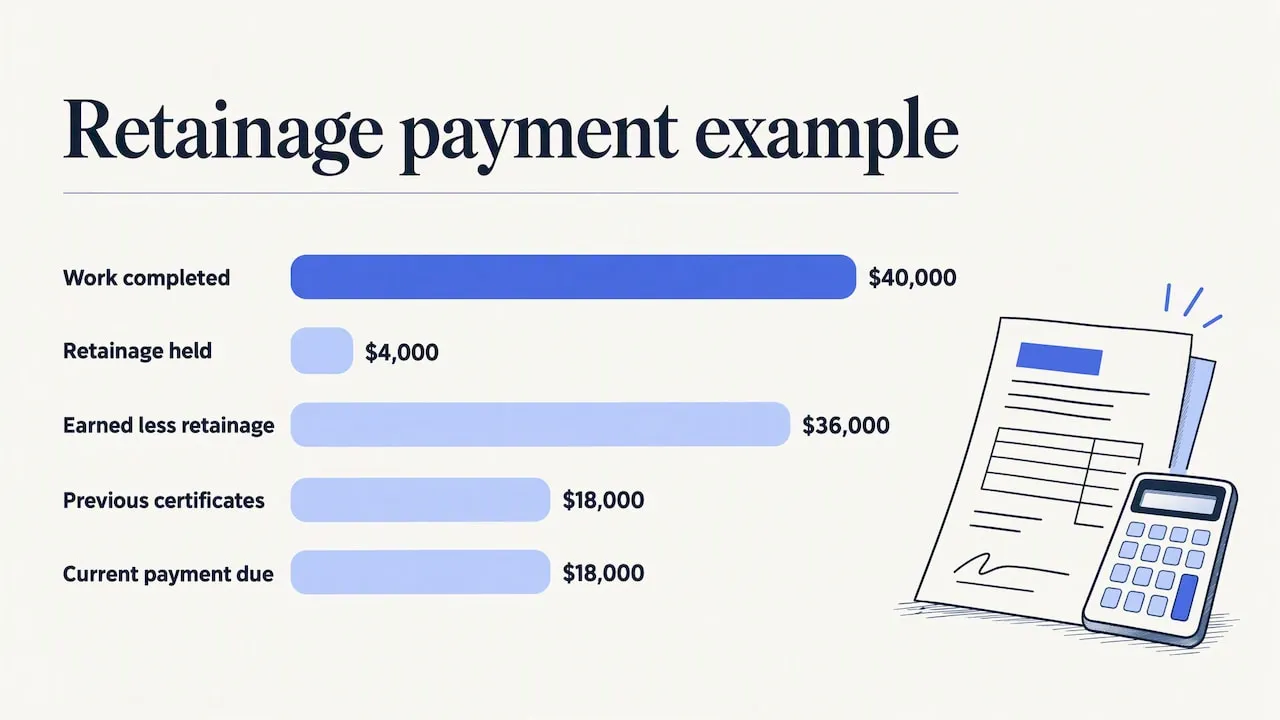
A quick worked example, using made-up numbers:
- Contract sum: $100,000
- Work completed to date after the second application: $40,000
- Retainage at 10% of completed work: $4,000
- Earned less retainage: $36,000
- Less previous certificates, say $18,000 paid after the first application
- Current payment due: $18,000
The money withheld is still yours. The cash-flow part is that you carry that $4,000 until release, so pricing retainage into your cash planning matters on thin-margin jobs. Retainage laws and limits differ by state and by public versus private work, so confirm the rules for your state and your contract.
How the AIA billing process runs
Here is the usual monthly rhythm.
- Agree the schedule of values. Get approval before you bill against it.
- Record progress. At the end of the billing period, walk the job and note what percent of each line is done.
- Fill in the G703. Enter this period’s work and stored materials, then let the math roll to totals and retainage.
- Complete the G702. Carry the totals over, add change orders, and sign.
- Submit. Per AIA Contract Documents, the contractor submits the G702 to the owner or payment issuer with the G703 detailing completed work, values, deductions and retainage. In some cases an architect or project manager also certifies it.
- Review and certification. The reviewer may approve it as is, or certify a lower amount with a note.
- Payment. The owner pays within the window your contract sets.
- Final application. At the end, you bill remaining balance and released retainage, usually with closeout paperwork.
Timing rules, such as the day of the month you submit, the backup the owner expects, and lien waivers attached to each request, live in your contract. They are not on the form.
Not every job uses the same forms
G702 and G703 are the pair people mean when they say AIA billing, but they are not the only options. AIA Contract Documents’ FAQ says the standard versions are G702-1992 and G703-1992, while other versions address cost-plus, subcontractor, construction-manager, and design-build arrangements.
The takeaway: the right application depends on the project’s delivery method, payment structure and your contracting role. If you are a subcontractor on a cost-plus job, don’t assume you use the same pair as a prime contractor on a fixed-price job. Ask the general contractor or architect which version they expect, before you build your first pay app.
Where AIA billing goes wrong
The forms are simple. Errors come from the details. These are the ones that slow payment:
- G702 and G703 totals don’t match. A single changed line that wasn’t carried to the summary is enough for a rejection.
- Billing a line above 100%. Or billing more than the scheduled value after a change order that was never added.
- Change orders not reflected. Approved changes need to appear in the contract sum. Unapproved ones should not be billed as if they were.
- Wrong retainage percentage. Check the contract, especially if retainage drops after a milestone.
- Missing signatures, notary or waivers. Many owners will not process an incomplete package.
- Late submission. Missing the monthly cutoff can push payment a full cycle.
- Wrong form version for your role. See the section above.
A short checklist before you hit send: totals tie, percentages are believable, change orders are signed, retainage matches the contract, and every required attachment is there.
Doing AIA billing without a spreadsheet nightmare
Many contractors start with a spreadsheet template and the math works until a change order lands mid-month. Others buy heavy accounting software that is built for an office, not a truck.
What you want from a tool is simple: carry previous billings forward automatically, calculate retainage per line, and keep everything on your phone so you can update progress while standing in the room you are billing for.
Our perspective
We built AeroInvoice by watching contractors bill from truck seats, job trailers and basements with no signal. What we hear most is not that progress billing is hard. It is that it gets done late, because the numbers live in someone’s head until Friday night.
Our view is that the habit matters more than the form. Bill at each stage while the work is fresh, keep your schedule of values honest, and keep your own record of percent complete. If an owner demands the full G702/G703 package, give them exactly that. If the job doesn’t require it, a clear staged invoice with a line-item breakdown does the same work and gets you paid sooner.
We will also be straight about our scope. AeroInvoice is built for progress draws, quotes, e-signatures and getting paid from a phone, with or without signal. If your contract requires the official AIA form layouts specifically, confirm what your owner or architect will accept before you rely on any tool, ours included.
— User
How AeroInvoice handles progress draws
If your jobs bill in stages, projects and progress draws in AeroInvoice let you bill at each project stage from your phone, and the app works offline, so a dead zone doesn’t stop you from updating a draw. Clients can sign electronically, and you can take card payments through online payments via Stripe, with no extra fee from us on those payments.
Pricing is published on our pricing page: the Free plan is $0 per month, Pro is $15 per month, and Business is $29 per month. The Free plan covers 5 documents a month; Pro and Business are unlimited. Most general contractors start with our general contractor tools.
Create your free account and try a draw on your next job.
Quick glossary
- Pay app: short for payment application.
- Schedule of values: the contract sum split into line items.
- Retainage: a percentage withheld from each payment until a set point.
- Stored materials: purchased materials not yet installed, billable only if the contract allows.
- Change order: a written change to scope or price, which adjusts the contract sum.
- Certification: the architect’s or project manager’s confirmation of the amount due.
For more terms, see our glossary of business document terms.
FAQ
What does AIA stand for in AIA billing?
AIA stands for the American Institute of Architects. The organization publishes standard construction contract and payment forms, which is why progress billing on the G702 and G703 carries its name. You do not need to be a member to use the process on a job that calls for it.
What is the AIA billing format?
The format is a two-part package. The G702 is the summary page with contract sum, work completed, retainage and amount due. The G703 is the continuation sheet listing each line of the schedule of values with the work completed and stored, retainage and balance to finish.
Do I need an architect for AIA billing?
Not always. AIA Contract Documents says that in some cases an architect or project manager certifies the application, and the contractor also certifies it. Whether a third party reviews yours depends on the contract.
Is the G703 the same as the G702?
No. The G702 is the cover application with totals, and the G703 is the itemized sheet behind it. They are submitted together, and the G703 totals must match the G702.
How often do I submit an AIA payment application?
Most contracts set a regular billing period, commonly monthly, but the contract controls the schedule. Check the submission date and any attachments it requires, so a missed cutoff doesn’t delay payment by a cycle.
Sources
- AIA Billing Explained: Streamlining Construction Payment Processes, AIA Contract Documents
- G702-1992 Application and Certificate for Payment, AIA Design Shop
- FAQs: Application and Certificate for Payment forms, AIA Contract Documents