Mobile Payment Processing for Contractors: Get Paid on Site
Mobile payment processing means taking a customer’s card, tap or bank payment on a phone or tablet instead of waiting on a check in the mail. For a contractor, it comes down to three ways to collect: tap or key in a card at the jobsite, send a payment link the client opens on their own phone, or attach a pay button to every invoice and progress draw. The right setup depends on how your jobs bill, how much signal you get, and who pays you.
This guide covers each method, what “offline” really means for payments, what fees to expect, and how to set things up so money lands while the crew is still on the job.
Take payments alongside your invoices. AeroInvoice lets contractors bill by project stage and take client payments through Stripe, and it keeps working offline on jobsites with no signal. Explore AeroInvoice
TL;DR
- Three ways to collect on site: tap or key in a card on your phone, send a payment link, or put a pay button on every invoice or draw.
- Most “offline” payment tools are hybrid. They record the sale without signal, but the money only clears once you reconnect.
- For larger contractor jobs, payment links and invoice-based payments usually beat card readers, because clients pay at the right moment, from their own phone, with a record attached.
- Processors charge a percentage plus a small fixed fee. Read the fee schedule before you sign, and check who pays it.
- AeroInvoice works offline, bills by stage, and takes client payments through Stripe with no added AeroInvoice fee on those payments.
Table of Contents
- What mobile payment processing means on a jobsite
- Three ways to collect payment on site
- Which method fits which job
- What “offline” really means for payments
- What mobile payments cost
- Getting approved and set up
- Why records matter as much as speed
- Our perspective: payments should follow the paperwork
- How to get paid faster with a phone
- Promo: Take payments from the same app you invoice in
- Setting up for your trade
- Mistakes that slow contractors down
- FAQ
- Sources
What mobile payment processing means on a jobsite
Most articles on this topic are written for coffee shops and food trucks. Contractors have a different problem. You rarely sell a $4 item across a counter. You sell a $3,800 deposit, a $12,000 progress draw, or a $640 service call, often to a homeowner who is not standing next to you when the work is done.
So “mobile payment processing” for a contractor covers a few separate things:
- Card-present payments. The client taps a card or phone against your phone, or you insert a card into a small reader.
- Card-not-present payments. The client pays through a link or invoice page, typing in a card or choosing a bank account.
- Mobile wallets. Apple Pay and Google Pay, which work with either of the above.
The habit is already there. The World Bank reports that digital merchant payments reached 42% of adults globally in 2024, up from 35% in 2021. Your clients are used to paying with a phone. What slows contractors down is usually the process on their side: invoices written at night, sent days later, with no easy way to pay.
Three ways to collect payment on site
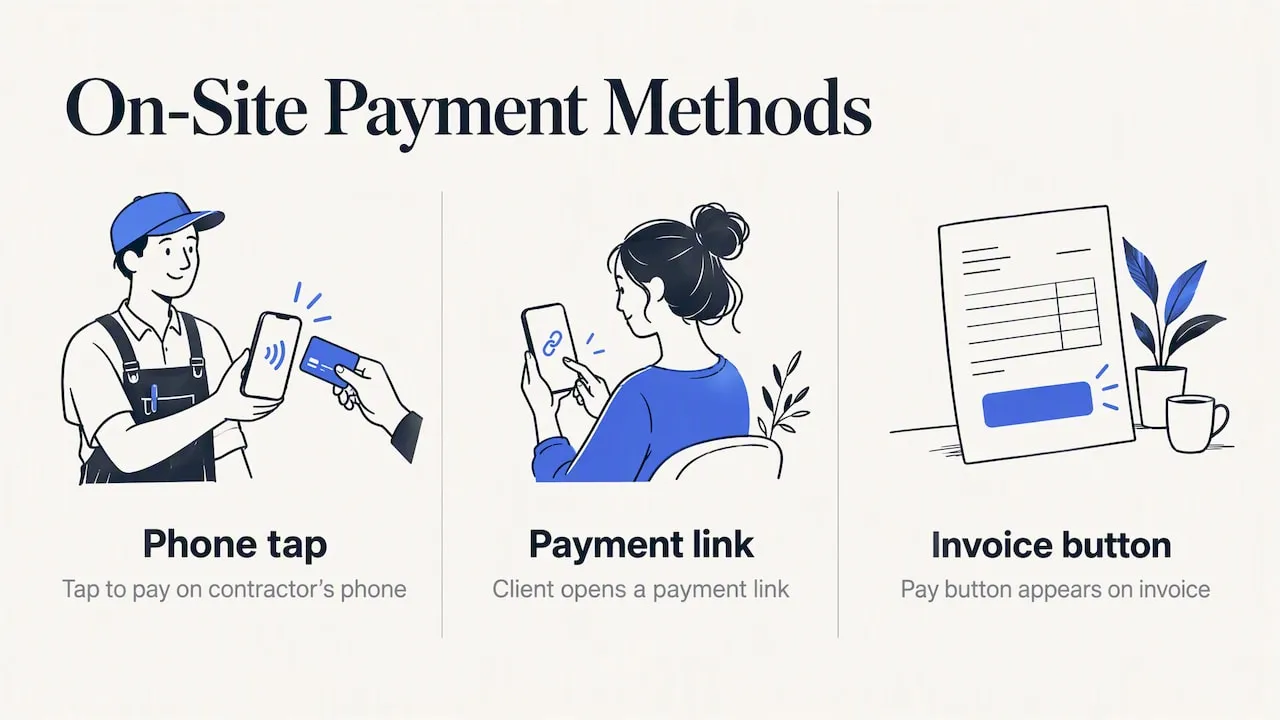
1. Tap to pay on your own phone
AeroInvoice does not offer tap to pay. This section describes what card processors offer in general.
Several processors now let you turn a recent phone into a card terminal with no separate hardware. The client taps a card, Apple Pay or Google Pay on the back of your phone. Setup is usually quick once your account is approved, and there is no reader to lose in the truck.
This works well for:
- Small service calls and repairs paid at the door
- COD materials or deposits when the client is standing there
- Callbacks where you want the money before you leave
It works less well for big balances. Many clients are uncomfortable tapping a card for several thousand dollars on a stranger’s phone, and card fees on large amounts add up fast.
2. A payment link the client opens themselves
A payment link is a web address that opens a secure checkout page for a specific amount. You text or email it. The client pays from their couch, the kitchen counter, or the office. You never touch their card number.
For contractors this is often the best fit, because:
- The client chooses when to pay, but you can send the link right when the work is signed off.
- You can offer a bank payment option for large amounts, which usually costs less than a card.
- The link carries the amount and the job reference, so nobody has to guess what a payment was for.
- It works for clients who are not on site, such as landlords, property managers and out-of-town owners.
3. A pay button on every invoice and draw
The cleanest approach is to skip the separate link altogether. The invoice itself carries the pay button. The client opens the invoice, reviews the line items, and pays on the same screen. When the payment comes in, the invoice marks itself paid.
That matters most on jobs billed in stages. If you run progress draws, each draw becomes its own invoice with its own pay button. No one has to remember what has been paid and what is outstanding.
Which method fits which job
| Situation | Best method | Why |
|---|---|---|
| $200 service call, client at home | Tap to pay or payment link | Fast, money before you leave |
| Deposit on a signed estimate | Pay button on the invoice | The client signs and pays in one visit |
| Progress draw on a remodel | Invoice with pay button | Each draw tracked against the contract |
| Final balance, owner out of town | Payment link or invoice | No need to be on site |
| Commercial client with an AP department | Invoice with bank payment option | They often prefer bank transfers to cards |
| Crew in a basement or rural area | Offline-capable invoicing | Create the document anywhere, send when connected |
What “offline” really means for payments
This is where contractors get burned, so read it closely. A lot of tools advertise offline payments. Federal Reserve researchers explain that most of these are hybrid systems: the transaction is approved locally, and the final clearing and settlement wait until the internet comes back. Truly offline payments, where value moves with no connection at all, are still in early development.
What does that mean at a jobsite with weak signal?
- The paperwork can be fully offline. You can write the estimate, build the invoice, capture a signature and log hours with no signal.
- The money cannot. A card payment or bank payment needs a connection somewhere along the line, whether yours or the client’s.
- Locally approved is not the same as paid. The same Fed note points out that offline-style systems may lack the real-time fraud checks of a fully online payment. If a tool lets you accept a card with no signal, ask what happens if that card is later declined.
The practical rule: use offline mode to get your documents done and sent the moment you have a bar of signal, and let the client pay from their own connection. Their home Wi-Fi is almost always better than your slab or crawlspace.
What mobile payments cost
Processors price in a few common ways. The usual structure is a percentage of each transaction, often with a small fixed fee on top. As one example from Australia, NAB Easy Tap lists 1.30% per tap for in-person contactless payments. US pricing differs, and the numbers change, so always check the current schedule from the processor itself before you commit.
When you compare, look at:
- The rate per card payment, including any fixed fee per transaction.
- Bank payment pricing. On a $15,000 draw, a card percentage is a real cost. A bank payment option is often far cheaper.
- Extra charges for keyed-in cards, chargebacks, or instant payouts.
- Your invoicing software’s own cut. Some tools add a platform fee on top of the processor’s fee. Ask for the all-in cost on a $5,000 payment, not the headline rate.
- Payout timing. Funds commonly reach a business bank account in one to two business days, and some services offer same-day settlement before a daily cutoff, as NAB’s Easy Tap page shows.
On large jobs, some contractors build the card fee into the price. Others offer a bank payment option or a small discount for it. Either is fine, as long as your contract and invoice say so clearly. Check your state’s rules on card surcharges before adding one.
Getting approved and set up
Approval is not instant with every provider. Expect identity checks for the business owners, and sometimes a credit check. Providers commonly want your tax ID, ownership details and basic financial information, and the process can take a business day or more, as NAB describes for its merchant applications. Do this before a big job, not on the day the first draw is due.
A simple setup checklist:
- Gather your EIN or tax ID, business address, owner IDs and bank account details.
- Connect your payment account to your invoicing software.
- Send yourself a test invoice and pay it with a real card for a small amount.
- Confirm where the payout lands and how long it takes.
- Put your payment terms and accepted methods on every estimate and invoice.
Why records matter as much as speed
There is a second benefit that contractors undervalue. The World Bank notes that moving from cash to digital payments creates real-time records of cash flow that can support later applications for working capital or expansion loans. If you ever want a line of credit for materials or a second truck, a clean history of invoices and matching payments is easier to show than a shoebox of deposit slips.
This is also why payments should connect to your invoices. A payment that lands in a separate app, with no link to a job, has to be matched by hand. In AeroInvoice, a client who pays through the invoice link is marked paid on that invoice, so you are not matching payments to jobs by hand. Automatic bank reconciliation is not in AeroInvoice yet; it is coming soon.
Our perspective: payments should follow the paperwork
We built AeroInvoice by watching contractors lose days of cash flow to small things. The invoice written at 9 pm on the couch. The card reader left in the other truck. The client who says “just send me a link” when you have one bar of signal in a basement.
Here is what we believe after seeing how crews actually work:
- Field first. Software for contractors has to work between two other jobs, with gloves nearby and weak signal. That is why the app installs on any mobile device and works offline. You can build the quote or invoice anywhere and send it when you reconnect.
- Be honest about offline. We do not promise that a card payment clears with no connection. Nobody can promise that yet. We promise that your documents, signatures, time and mileage do not depend on signal, and that the client can pay the moment the invoice reaches them.
- Bill at every stage. Waiting for the final invoice is how a good job turns into a cash flow problem. Progress draws, deposits and milestone invoices keep money moving while you buy materials and pay the crew.
- No extra fee from us. Payments run through Stripe, and AeroInvoice adds no fee on top of those payments. Stripe’s own processing rates still apply, so check them on Stripe’s site.
A payment tool should shorten the gap between “job done” and “money in the bank”. Everything else is decoration.
— User
How to get paid faster with a phone
The tool is half of it. The habits are the other half.
- Collect a deposit with the signed estimate. A client who signs and pays in one step is committed. AeroInvoice collects client e-signatures on estimates, so the sign-off and the first invoice can happen in the same visit.
- Invoice the same day. Send the invoice before you leave the driveway. The longer the gap, the slower the payment.
- Tie each draw to a milestone. Name it plainly: “Framing complete”, “Rough-in passed inspection”. Clients pay faster when they can see what they are paying for.
- Offer more than one way to pay. A card for the client who wants rewards points, a bank payment for the one writing a large check.
- Attach proof. Photos of finished work go a long way toward a quick yes. You can keep them with the job using jobsite photos and files.
- Put terms in writing. Due dates, late-payment terms and accepted methods belong on the document, not in a text thread.
Promo: Take payments from the same app you invoice in
AeroInvoice puts the estimate, the invoice, the e-signature and the pay button in one place, built for contractors and field crews. Clients pay by card or bank through Stripe from online payments on every invoice, and you can start with the free plan.
| Plan | Price |
|---|---|
| FREE | $0 per month |
| PRO | $15 per month |
| BUSINESS | $29 per month |
Plans differ by the number of documents you can create each month. See the details on the pricing page, then create your free account.
Setting up for your trade
A roofer billing a deposit before a tear-off, an HVAC tech closing a service call, and a landscaper on a recurring maintenance contract all collect differently. That is why we built templates for each trade. Browse invoicing by trade to see line items and terms already set up for your work, including roofing, plumbers and general contractors.
If you want to see the document side before committing, the free invoice generator lets you build a clean invoice in a few minutes. Our features page shows the rest: time and mileage tracking, expense tracking, recurring invoices and branded layouts.
Mistakes that slow contractors down
- Relying on cash and checks for large amounts. Checks get lost, held and bounced. A bank payment link clears more predictably.
- Buying hardware you do not need. If most of your payments are invoice-based, you may never touch a card reader.
- Ignoring the all-in fee. A low processor rate does not help if the invoicing tool adds its own percentage.
- Skipping the test payment. Run one real payment before your first big draw.
- Trusting an “offline” promise you have not tested. Ask the vendor exactly what happens to a card approved without signal, and who bears the loss if it later fails.
FAQ
What is the best way to collect payment on site?
For small service calls, tapping a card on your phone is fast. For deposits, draws and final balances, a payment link or an invoice with a pay button is usually better. The client pays from their own device, and the payment is tied to the job.
Can I take payments with no cell signal?
You can create estimates and invoices offline, but the payment itself needs a connection at some point. Most offline payment tools are hybrid: they approve locally and settle once you reconnect, as the Federal Reserve explains. The simplest approach is to send the invoice when you get signal and let the client pay from theirs.
How long until the money reaches my bank account?
It depends on the processor and your account. Funds commonly arrive in one to two business days, and some services offer same-day settlement before a cutoff time. Check the payout schedule in your payment account before relying on a specific date.
Do I need a card reader?
Not always. A modern phone can accept contactless payments with the right app, and many contractors never use a reader because clients pay through links or invoices. A reader only makes sense if you regularly sell at the door or on the truck.
Does AeroInvoice charge fees on client payments?
No. AeroInvoice adds no fee on payments made through it. Payments are processed by Stripe, so Stripe’s standard processing rates apply. The Free plan covers 5 documents a month; Pro ($15 a month) and Business ($29 a month) are unlimited.
Sources
- World Bank: Digital technology is unlocking financial inclusion
- Federal Reserve: Offline Payments, Implications for Reliability and Resiliency in Digital Payment Systems
- NAB Easy Tap: contactless card payments for merchants